
Transformers documentation
使用 Backbone API 训练视觉模型
使用 Backbone API 训练视觉模型
计算机视觉工作流遵循一种通用模式。使用预训练骨干网络进行特征提取(ViT、DINOv3)。添加一个“颈部”模块以增强特征。再连接一个针对特定任务的头部(例如用于目标检测的 DETR,或用于分割的 MaskFormer)。
Transformers 库实现了这些模型,backbone API 允许您以极少的代码更换不同的 backbone 和 head。
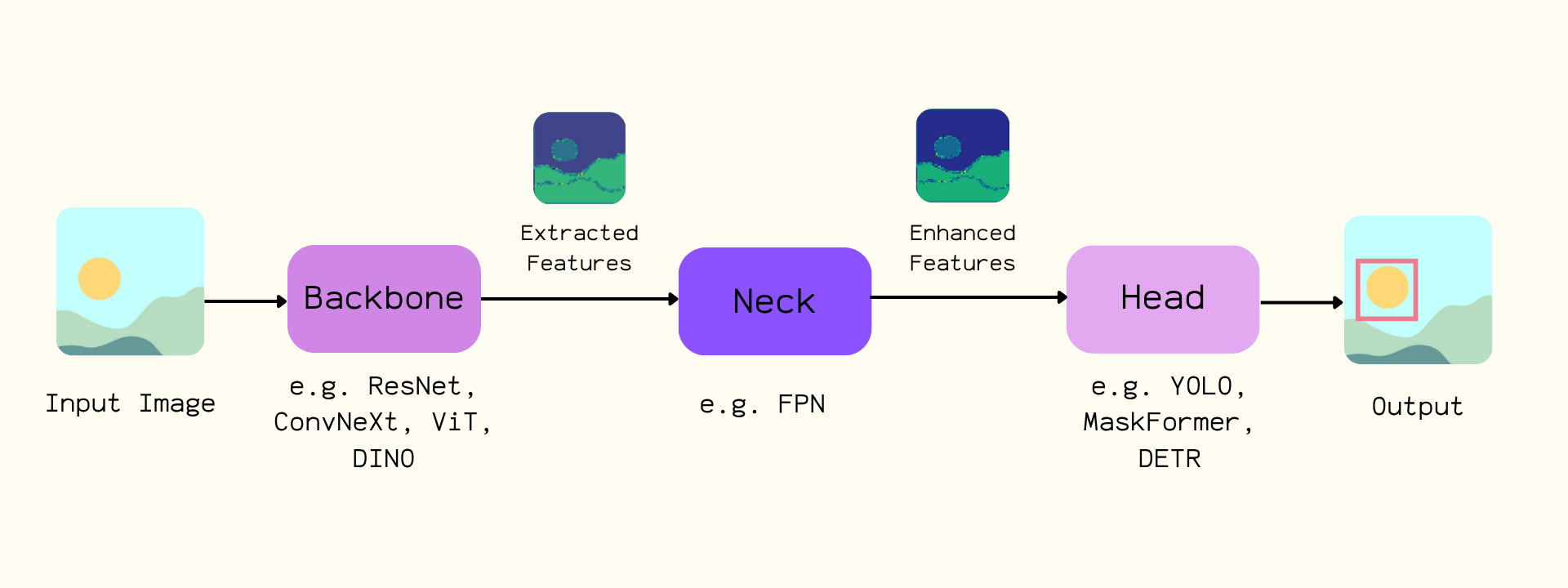
本指南将 DINOv3 与 ConvNext 架构 和 DETR 头 相结合。您将在 车牌检测数据集 上进行训练。截至本文撰写时,DINOv3 可提供最佳性能。
此模型需要访问权限审批。请访问模型仓库申请访问权限。
安装 trackio 用于实验跟踪,安装 albumentations 用于数据增强。请使用最新版本的 transformers。
pip install -Uq albumentations trackio transformers datasets
使用预训练的 DINOv3 ConvNext 主干网络初始化 DetrConfig。使用 num_labels=1 来检测车牌的边界框。使用此配置创建 DetrForObjectDetection。冻结主干网络以保留 DINOv3 特征且不更新权重。加载 DetrImageProcessor。
from transformers import DetrConfig, DetrForObjectDetection, AutoImageProcessor

# Create a model with randomly initialized weights
backbone_config = AutoConfig.from_pretrained("facebook/dinov3-convnext-large-pretrain-lvd1689m")
backbone = AutoBackbone.from_pretrained("facebook/dinov3-convnext-large-pretrain-lvd1689m")

config = DetrConfig(backbone_config=backbone_config,
                    num_labels=1, id2label={0: "license_plate"}, label2id={"license_plate": 0})
model = DetrForObjectDetection(config)

# Assign pretrained backbone checkpoint and freeze the weights
model.model.backbone = backbone
model.model.freeze_backbone()

image_processor = AutoImageProcessor.from_pretrained("facebook/detr-resnet-50")
加载数据集并将其拆分为训练集。
from datasets import load_dataset
ds = load_dataset("merve/license-plates")
ds = ds["train"]

ds = ds.train_test_split(test_size=0.05)
train_dataset = ds["train"]
val_dataset = ds["test"]
len(train_dataset)
# 5867
增强数据集。将图像缩放至最大尺寸,进行翻转,并应用仿射变换。移除无效的边界框,并使用 rebuild_objects 确保标注保持整洁。
import albumentations as A
import numpy as np
from PIL import Image

train_aug = A.Compose(
    [
        A.LongestMaxSize(max_size=1024, p=1.0),
        A.HorizontalFlip(p=0.5),
        A.Affine(rotate=(-5, 5), shear=(-5, 5), translate_percent=(0.05, 0.05), p=0.5),
    ],
    bbox_params=A.BboxParams(format="coco", label_fields=["category_id"], min_visibility=0.0),
)

def train_transform(batch):
    imgs_out, objs_out = [], []
    original_imgs, original_objs = batch["image"], batch["objects"]

    for i, (img_pil, objs) in enumerate(zip(original_imgs, original_objs)):
        img = np.array(img_pil)
        labels = [0] * len(objs["bbox"])

        out = train_aug(image=img, bboxes=list(objs["bbox"]), category_id=labels)

        if len(out["bboxes"]) == 0:
            imgs_out.append(img_pil) # if no boxes left after augmentation, use original
            objs_out.append(objs)
            continue

        H, W = out["image"].shape[:2]
        clamped = []
        for (x, y, w, h) in out["bboxes"]:
            x = max(0.0, min(x, W - 1.0))
            y = max(0.0, min(y, H - 1.0))
            w = max(1.0, min(w, W - x))
            h = max(1.0, min(h, H - y))
            clamped.append([x, y, w, h])

        imgs_out.append(Image.fromarray(out["image"]))
        objs_out.append(rebuild_objects(clamped, out["category_id"]))

    batch["image"] = imgs_out
    batch["objects"] = objs_out
    return batch


def rebuild_objects(bboxes, labels):
    bboxes = [list(map(float, b)) for b in bboxes]
    areas  = [float(w*h) for (_, _, w, h) in bboxes]
    ids    = list(range(len(bboxes)))
    return {
        "id": ids,
        "bbox": bboxes,
        "category_id": list(map(int, labels)),
        "area": areas,
        "iscrowd": [0]*len(bboxes),
    }

train_dataset = train_dataset.with_transform(train_transform)
为图像处理器构建 COCO 风格的标注。
import torch

def format_annotations(image, objects, image_id):
    n = len(objects["id"])
    anns = []
    iscrowd_list = objects.get("iscrowd", [0] * n)
    area_list = objects.get("area", None)

    for i in range(n):
        x, y, w, h = objects["bbox"][i]
        area = area_list[i] if area_list is not None else float(w * h)

        anns.append({
            "id": int(objects["id"][i]),
            "iscrowd": int(iscrowd_list[i]),
            "bbox": [float(x), float(y), float(w), float(h)],
            "category_id": int(objects.get("category_id", objects.get("category"))[i]),
            "area": float(area),
        })

    return {"image_id": int(image_id), "annotations": anns}
在数据整理器中创建批次。格式化注释,并将其与转换后的图像一起传递给图像处理器。
def collate_fn(examples):
    images = [example["image"] for example in examples]
    ann_batch = [format_annotations(example["image"], example["objects"], example["image_id"]) for example in examples]

    inputs = image_processor(images=images, annotations=ann_batch, return_tensors="pt")
    return inputs
初始化 Trainer 并配置 TrainingArguments 以实现模型收敛。将数据集、数据整理器、参数和模型传入 Trainer 以开始训练。
from transformers import Trainer, TrainingArguments

training_args = TrainingArguments(
    output_dir="./license-plate-detr-dinov3",
    per_device_train_batch_size=4,
    per_device_eval_batch_size=4,
    num_train_epochs=8,
    learning_rate=1e-5,
    weight_decay=1e-4,
    warmup_steps=500,
    eval_strategy="steps",
    eval_steps=500,
    save_total_limit=2,
    dataloader_pin_memory=False,
    fp16=True,
    report_to="trackio",
    load_best_model_at_end=True,
    remove_unused_columns=False,
    push_to_hub=True,
)

trainer = Trainer(
    model=model,
    args=training_args,
    train_dataset=train_dataset,
    eval_dataset=val_dataset,
    data_collator=collate_fn,
)

trainer.train()
将 trainer 和 image processor 推送到 Hub。
trainer.push_to_hub()
image_processor.push_to_hub("merve/license-plate-detr-dinov3")
使用目标检测流水线测试模型。
from transformers import pipeline

obj_detector = pipeline(
    "object-detection", model="merve/license-plate-detr-dinov3"
)
results = obj_detector("https://huggingface.co/datasets/merve/vlm_test_images/resolve/main/license-plates.jpg", threshold=0.05)
print(results)
可视化结果。
from PIL import Image, ImageDraw
import numpy as np
import requests


def plot_results(image, results, threshold):
    image = Image.fromarray(np.uint8(image))
    draw = ImageDraw.Draw(image)
    width, height = image.size

    for result in results:
        score = result["score"]
        label = result["label"]
        box = list(result["box"].values())

        if score > threshold:
            x1, y1, x2, y2 = tuple(box)
            draw.rectangle((x1, y1, x2, y2), outline="red")
            draw.text((x1 + 5, y1 + 10), f"{score:.2f}", fill="green" if score > 0.7 else "red")

    return image

image = Image.open(requests.get("https://huggingface.co/datasets/merve/vlm_test_images/resolve/main/license-plates.jpg", stream=True).raw)
plot_results(image, results, threshold=0.05)